Java 基础

1 Java基本语法

1. 输出 Hello World

  • 创建.java结尾的文件

  • 每个文件由类构成

  • 类中有一个main方法,代表程序的入口

    1
    2
    3
    4
    5
    public class Main {
    public static void main(String[] args) {
    System.out.println("Hello World");
    }
    }

2. 基本概念和运行原理

JDK:开发Java应用的工具包

  • JDK => 包含编译工具JAVAC、运行环境JRE、其他工具

  • JAVAC => 将.java文件编译成字节码文件.class

  • JRE => JRE中的JVM会将字节码文件转换为不同设备上的机器码运行 => 可以跨平台运行的原因
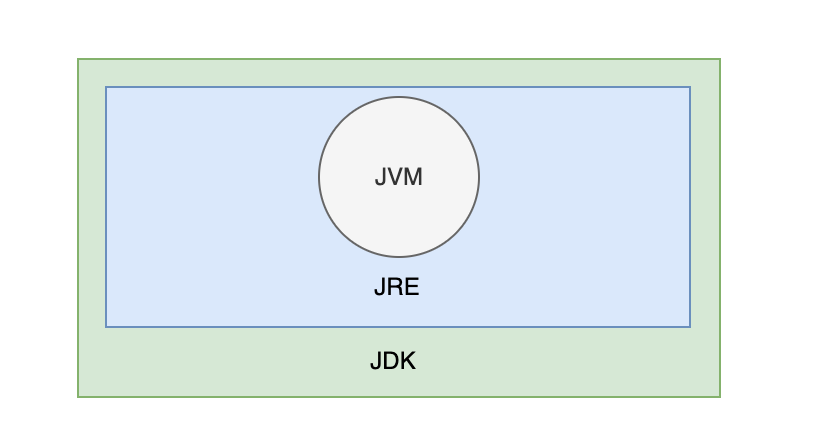
jdk1

1.1 数据类型

1.1.1 基本数据类型

  • 包括 byteshortintlongfloatdoublebooleanchar 8种

    1
    2
    3
    4
    int myNum = 5;               // 整数
    float myFloatNum = 5.99f; // 浮点数
    char myLetter = 'D'; // 字符
    boolean myBool = true; // 布尔值
    数据类型 大小 描述
    byte 1 字节 存储从 -128 到 127 的整数。
    short 2 字节 存储从 -32,768 到 32,767 的整数。
    int 4 字节 存储从 -2,147,483,648 到 2,147,483,647 的整数。
    long 8 字节 存储从 -9,223,372,036,854,775,808 到 9,223,372,036,854,775,807 的整数。
    float 4 字节 存储小数。足以存储 6 到 7 位十进制数字。
    double 8 字节 存储小数。足以存储 15 位十进制数字。
    boolean 不确定 存储 true 值或 false 值。
    char 2 字节 存储单个字符/字母或 ASCII 值

1.1.2 引用数据类型

  • 包括字符串、数组、类等

1.1.3 包装类型

包装类型是 Java 中的一种特殊类型,用于将基本数据类型转换为对应的对象类型。

  • 包装类型提供了许多实用的方法

    1
    2
    3
    4
    5
    6
    7
    8
    9
    10
    11
    12
    13
    14
    15
    16
    17
    // 3. 包装类型
    Integer integerValue1 = new Integer(11); // 每次都创建新对象
    Integer integerValue2 = Integer.valueOf(22); // 优先用缓存对象,把数字 22 转换成【整数对象】
    Integer integerValue3 = 33;
    System.out.println("integerValue1 = " + integerValue1);
    System.out.println("integerValue2 = " + integerValue2);
    System.out.println("integerValue3 = " + integerValue3);

    // 将字符串转换为整数
    String numberString = "123";
    int parsedNumber = Integer.parseInt(numberString);
    System.out.println("parsedNumber = " + parsedNumber);

    // 数字比较
    Integer a = 10; // 转成Integer后才能使用equals方法
    Integer b = 20;
    System.out.println(a.equals(b)); // 输出 false
  • 对应基本数据类型的8种包装类型:

    • Byte(对应 byte)
    • Short(对应 short)
    • Integer(对应 int)
    • Long(对应 long)
    • Float(对应 float)
    • Double(对应 double)
    • Character(对应 char)
    • Boolean(对应 boolean)

1.1.4 类型转换

  • 放大转换(自动) - 将较小的类型转换为较大的类型 byte -> short -> char -> int -> long -> float -> double

    1
    2
    3
    4
    5
    6
    7
    8
    9
    10
    11
    12
    13
    14
    15
    16
    17
    18
    19
    // 4. 类型转换--隐式转换
    // 4.1自动转换,小类型到大类型
    int myInt = 3;
    float myFloat1 = myInt; // 自动转为 float
    char myChar = 'A';
    myInt = myChar;
    float myFloat2 = myChar;

    System.out.println("myFloat = " + myFloat1); // 输出 3.0,float类型
    System.out.println("myInt = " + myInt);
    System.out.println("myFloat2 = " + myFloat2);

    // 运算中自动转换类型
    float myFloat3 = 1.5f;
    double myDouble = 1.2;
    int num1 = 1;
    int num2 = 2;
    double res = myFloat3 * num1 + myDouble * num2;
    System.out.println(res); // double类型
  • 缩小转换(手动) - 将较大的类型转换为较小的类型 double -> float -> long -> int -> char -> short -> byte

    1
    2
    3
    4
    5
    6
    7
    8
    9
    10
    // 3.2手动转换,大类型到小类型
    int myInt2 = 72;
    float myFloat4 = 2.1f;
    char myChar2 = (char) myInt2;

    // myInt2 = (int) myInt * myFloat4; -> 错误写法,只是强转了后面的当个变量或表达式
    myInt2 = (int) (myInt2 * myFloat4);

    System.out.println("myChar2 = " + myChar2); // 输出2(2对应的ACSII码为 H)
    System.out.println("myInt2 = " + myInt2); // 输出 151
  • 踩坑点

    1
    2
    3
    4
    5
    int a = 1500000000, b = 1500000000;
    int res1 = a + b; // -1294967296
    long res2 = a + b; // -1294967296
    long res3 = (long)a + b; // 3000000000
    long res4 = (long)(a + b); // -1294967296

    res1: 由于超出了int可存储的范围,溢出;

    res2: 尽管隐式转换前已经溢出

    res2: a被强转成long,此时再与b相加,b会隐式自动转为long,就不会溢出

    res4: 同res2,再加法完成后已经溢出,再隐式转换还是强制转换都不管用了

1.2 基本语法

运算、循环、分支同大多数语言

1.3 字符串

1
String S = "Hello";

Java 中的字符串实际上是对象,拥有可对字符串执行操作的方法。例如,可以用 length() 方法确定字符串的长度:

1.3.1 字符串方法

1
2
3
4
5
6
7
8
9
10
11
12
13
14
15
16
17
18
19
20
21
22
23
24
25
26
27
28
29
30
31
32
33
34
35
36
37
38
39
40
41
42
43
44
45
46
47
48
49
50
51
52
53
54
55
56
57
58
59
60
61
62
63
64
65
66
67
68
69
70
71
72
73
74
75
76
77
78
79
80
81
82
83
84
85
86
87
88
89
90
91
System.out.println("===== 获取字符串信息 =====");
// 1. length(): 获取字符串长度
String str = "Hello, Java!";
int length = str.length();
System.out.println("字符串长度: " + length); // 输出: 12

// 2. charAt(int index): 获取指定索引处的字符
char ch = str.charAt(7);
System.out.println("索引 7 处的字符: " + ch); // 输出: J

// 3. indexOf(String str) 和 lastIndexOf(String str): 查找子字符串的位置
int firstIndex = str.indexOf("Java");
int lastIndex = str.lastIndexOf("Java");
System.out.println("第一次出现 'Java' 的位置: " + firstIndex); // 输出: 7
System.out.println("最后一次出现 'Java' 的位置: " + lastIndex); // 输出: 7


// ======================== 字符串比较 ========================
System.out.println("\n===== 字符串比较 =====");

// 4. equals() 和 equalsIgnoreCase(): 比较字符串内容
String str1 = "Java";
String str2 = "java";
boolean isEqual = str1.equals(str2);
boolean isEqualIgnoreCase = str1.equalsIgnoreCase(str2);
System.out.println("区分大小写比较: " + isEqual); // 输出: false
System.out.println("忽略大小写比较: " + isEqualIgnoreCase); // 输出: true


// ======================== 字符串修改 ========================
System.out.println("\n===== 字符串修改 =====");

// 6. toLowerCase() 和 toUpperCase(): 大小写转换
String mixedCase = "Hello, World!";
String lowerCase = mixedCase.toLowerCase();
String upperCase = mixedCase.toUpperCase();
System.out.println("小写: " + lowerCase); // 输出: hello, world!
System.out.println("大写: " + upperCase); // 输出: HELLO, WORLD!

// 7. trim(): 去除首尾空白字符
String withSpaces = " Hello, Java! ";
String trimmed = withSpaces.trim();
System.out.println("去除空格后: '" + trimmed + "'"); // 输出: 'Hello, Java!'

// 8. replace(char oldChar, char newChar) 和 replace(CharSequence target, CharSequence replacement): 替换字符或子字符串
String original = "Hello, Java!";
String replacedChar = original.replace('J', 'L');
String replacedString = original.replace("Java", "Python");
System.out.println("替换字符: " + replacedChar); // 输出: Hello, Lava!
System.out.println("替换子字符串: " + replacedString); // 输出: Hello, Python!


// ======================== 字符串分割与拼接 ========================
System.out.println("\n===== 字符串分割与拼接 =====");

// 9. split(String regex): 按正则表达式分割字符串
String fruits = "apple,banana,cherry";
String[] parts = fruits.split(",");
System.out.print("分割后的字符串数组: ");
for (String part : parts) {
System.out.print(part + " "); // 输出: apple banana cherry
}
System.out.println();

// 10. join(CharSequence delimiter, CharSequence... elements): 拼接字符串
String joined = String.join("-", "2023", "10", "05");
System.out.println("拼接后的字符串: " + joined); // 输出: 2023-10-05


// ======================== 字符串判断 ========================
System.out.println("\n===== 字符串判断 =====");

// 11. startsWith(String prefix) 和 endsWith(String suffix): 判断字符串是否以指定前缀或后缀开头/结尾
String sentence = "Hello, Java!";
boolean startsWithHello = sentence.startsWith("Hello");
boolean endsWithJava = sentence.endsWith("Java!");
System.out.println("以 'Hello' 开头: " + startsWithHello); // 输出: true
System.out.println("以 'Java!' 结尾: " + endsWithJava); // 输出: true

// 12. isEmpty() 判断字符串是否为空或空白
String emptyString = "";
boolean isEmpty = emptyString.isEmpty();
System.out.println("是否为空字符串: " + isEmpty); // 输出: true


// ======================== 字符串提取 ========================
System.out.println("\n===== 字符串提取 =====");
// 13. substring(int beginIndex, int endIndex): 提取子字符串
String text = "Hello, Java!";
String subText = text.substring(7, 11); // 左闭右开
System.out.println("提取的子字符串: " + subText); // 输出: Java

1.3.2 字符串拼接

1
2
3
4
5
6
7
8
9
10
11
12
13
String firstName = "Bi";
String lastName = "ouwai";
System.out.println(firstName + lastName);
System.out.println(firstName.concat(lastName));

// 与数字拼接
int x = 10;
int y = 20;
int z = x + y; // z 将是 30(整数/数字)

String x = "10";
String y = "20";
String z = x + y; // z 将是 1020(字符串)

1.3.3 特殊字符

因为字符串必须写在引号内,Java 会误解包含引号的字符串,并产生错误:

1
String txt = "abc"d"e."; // d的位置会报错

反斜杠 (\) 转义字符将特殊字符转换为字符串字符:

转义字符 结果
\’ '
\“ "
\\ \
\n 换行
\r 回车
\t 制表符
\b 退格

1.4 数组

存储固定大小的相同类型元素 的数据结构

1.4.1 基本特点

  • 固定大小 :一旦创建,数组的大小不能改变。
  • 同类型元素 :数组中的所有元素必须是相同的类型。
  • 连续内存 :数组在内存中是连续存储的,因此可以通过索引快速访问元素。
  • 零基索引 :数组的第一个元素的索引是0,最后一个元素的索引是length - 1,访问数组时超出索引会报错。

1.4.2 声明与初始化

1
2
3
4
5
6
7
8
9
10
11
12
13
14
15
16
17
18
19
20
21
22
23
24
25
26
27
28
29
30
31
32
33
34
35
36
37
38
39
40
41
42
43
44
// 数组基本概念
// 1. 声明并静态初始化一个数组
int[] numbers = {10, 20, 30, 40, 50};
System.out.println("初始化的数组:");
for (int i : numbers) System.out.println(i);

// 2. 访问数组元素
System.out.println("\n访问数组元素:");
System.out.println("numbers[0]: " + numbers[0]); // 输出第一个元素
System.out.println("numbers[2]: " + numbers[2]); // 输出第三个元素

// 3. 修改数组元素
numbers[1] = 25; // 修改第二个元素
System.out.println("\n修改后的数组:");
for (int i : numbers) System.out.println(i);

// 4. 获取数组长度
System.out.println("\n数组的长度: " + numbers.length);

// 5. 遍历数组
System.out.println("\n遍历数组:");
for (int i = 0; i < numbers.length; i++) {
System.out.println("Element at index " + i + ": " + numbers[i]);
}

// 6. 使用增强型for循环遍历数组
System.out.println("\n使用增强型for循环遍历数组:");
for (int num : numbers) {
System.out.println(num);
}

// 7. 多维数组的静态初始化
int[][] matrix = {
{1, 2, 3},
{4, 5, 6},
{7, 8, 9}
};
System.out.println("\n二维数组matrix:");
for (int i = 0; i < matrix.length; i++) {
for (int j = 0; j < matrix[i].length; j++) {
System.out.print(matrix[i][j] + " ");
}
System.out.println();
}

1.4.3 数组常用方法

1
2
3
4
5
6
7
8
9
10
11
12
13
14
15
16
17
18
19
20
21
22
23
24
25
26
27
28
29
30
31
32
33
34
35
36
37
38
39
40
41
// 数组常用方法
// 1. 排序数组 (Arrays.sort)
Arrays.sort(numbers); // 对数组进行升序排序
System.out.println("\n排序后的数组:");
for (int i : numbers) System.out.println(i);

// 2. 复制数组 (Arrays.copyOf)
int[] copiedArray = Arrays.copyOf(numbers, numbers.length);
System.out.println("\n复制后的数组:");
for (int i : copiedArray) System.out.println(i);

// 3. 填充数组 (Arrays.fill)
Arrays.fill(copiedArray, 10); // 将数组的所有元素设置为10
System.out.println("\n填充后的数组:");
for (int i : copiedArray) System.out.println(i);

// 4. 查找元素 (Arrays.binarySearch)
// 注意:使用binarySearch前需要确保数组已排序
int searchKey = 3;
int index = Arrays.binarySearch(numbers, searchKey);
if (index >= 0) {
System.out.println("\n元素 " + searchKey + " 在数组中的索引位置是: " + index);
} else {
System.out.println("\n元素 " + searchKey + " 不在数组中");
}

// 5. 比较数组 (Arrays.equals)
int[] array1 = {1, 2, 3};
int[] array2 = {1, 2, 3};
System.out.println(array1 == array2); // 此处比较的是两个array的地址是否相同
boolean isEqual = Arrays.equals(array1, array2); // 比较两个数组是否相等
System.out.println("\narray1 和 array2 是否相等: " + isEqual);

// 6 转换数组为字符串 (Arrays.toString)
System.out.println("\n将数组转换为字符串:");
System.out.println(Arrays.toString(numbers));

// 7. 多维数组的操作 (Arrays.deepToString)
System.out.println("\n二维数组matrix:");
System.out.println(Arrays.toString(matrix));
System.out.println(Arrays.deepToString(matrix)); // 使用deepToString打印多维数组

2 面向对象

2.1 类基本介绍

对象
动物 猫、狗、鸡
奔驰、宝马

2.1.1 类的基本结构

  • 属性(Field) :也称为成员变量或字段,用于描述对象的状态。
  • 方法(Method) :用于定义对象的行为或操作。
  • 构造方法(Constructor) :用于创建类的实例,并初始化对象的状态。
  • 内部类(Inner Class,可选) :定义在另一个类内部的类。
1
2
3
4
5
6
7
8
9
10
11
12
13
14
public class 类名 {
// 字段(属性)
数据类型 属性名;

// 构造器
public 类名(参数列表) {
// 初始化代码
}

// 方法
public 返回值类型 方法名(参数列表) {
// 方法体
}
}

类的访问修饰符有public、默认、final。

public是任何类都能访问该类,默认只能在同一个包中访问,final阻止其他类去继承它。

2.1.2 类属性

2.1.2.1 访问修饰符:

  • private:作用范围仅限于定义该成员的类内部

  • default:作用范围仅限于同一包内的类。

  • protected:作用范围包括同一包内的类以及不同包中的子类。

  • public:作用范围对所有类开放,没有任何访问限制。

  • 访问范围:

    访问修饰符 同一类 同一包 子类(不同包) 其他包
    private ✔️
    default ✔️ ✔️
    protected ✔️ ✔️ ✔️
    public ✔️ ✔️ ✔️ ✔️
  • 代码示例:

    1
    2
    3
    4
    5
    6
    public class myCar {
    private String model; // 私有属性,只能在myCar类中访问
    protected int year; // 受保护属性,同一包和子类可访问
    String color; // 默认属性,同一包可访问
    public double price; // 公共属性,所有类可访问
    }

2.1.2.2 其他修饰符:

  • static:声明为静态字段,属于类本身而非实例。
  • final:声明为常量,值不可修改。

2.1.3 类方法

1
2
3
[访问修饰符] [其他修饰符] 返回值类型 方法名(参数列表) {
// 方法体
}

2.1.3.1 方法类型

  • 静态方法

    • 使用 static 修饰符声明的方法

    • 属于类本身,可以通过类名直接调用

    • 不能直接访问实例字段或实例方法

  • 非静态方法

    • 未使用 static 修饰符的方法

    • 属于类的实例,必须通过对象调用

    • 可以访问非静态字段和其他方法

  • 构造方法

    • 与类同名且没有返回值类型的方法

    • 用于创建类的实例并初始化对象的状态

      1
      2
      3
      4
      5
      6
      7
      8
      9
      10
      public class Person {
      private String name;
      private int age;

      // 构造方法
      public Person(String name, int age) { // 可有参数、可无参数
      this.name = name;
      this.age = age;
      }
      }

2.1.3.2 方法访问修饰符

类的属性

2.2 封装、继承、多态

2.2.1 封装

  • 定义 :封装是将类的内部实现细节隐藏起来,并通过公共方法(getter 和 setter)提供受控的访问。

  • 目的

    • 提高安全性

      • 通过隐藏字段并提供受控的访问方法,可以防止外部类直接修改字段,从而避免非法操作。

      • 可以在 setter 方法中添加校验逻辑,确保字段值的有效性。

    • 增强可维护性

      • 如果需要修改内部实现,只需调整类的内部逻辑,而无需修改外部代码 -> 例如,我要将年龄从int改为String,不用再外部一个一个改了,而是在内部统一处理

        1
        2
        3
        4
        5
        6
        7
        8
        9
        10
        11
        12
        13
        14
        15
        16
        17
        18
        public class Person {
        private String name;
        private int age;

        // ...省略name的getter、setter方法
        public int getAge() {
        return age;
        }

        public void setAge(int age) {
        if (age > 0) { // 添加校验逻辑
        // this.age = age;
        this.age = String.valueOf(age); // 若后期需更改
        } else {
        System.out.println("年龄必须为正数!");
        }
        }
        }
    • 隐藏信息,实现细节

      例如性别在数据库中存储为0、1,但要展示为男,女

      1
      2
      3
      4
      5
      6
      7
      8
      9
      public String getSexName() {
      if("0".equals(sex)){
      sexName = "女";
      }
      else if("1".equals(sex)){
      sexName = "男";
      }
      return sexName;
      }

2.2.2 继承

继承 允许一个类(称为子类或派生类)从另一个类(称为父类或基类)继承属性和方法。通过继承,子类可以复用父类的代码,并且可以在子类中添加新的功能或修改现有的功能。

2.2.2.1 继承的特点

  • 代码复用 :子类可以直接使用父类的属性和方法,避免了重复编写代码。

  • 扩展性 :子类可以在继承父类的基础上,添加新的属性和方法,或者重写父类的方法。

  • 多态性 :通过继承,Java支持多态性,即同一个方法可以在不同的子类中有不同的实现。

2.2.2.2 继承知识点

  • 子类中super.a、super.a()、super() -> 分别拿到了父类属性,调用了父类方法,构造方法

  • 子类可重写父类方法(加上@Override更规范,编译器可以帮助我们检查)

  • final方法不能被重写

  • final类不能被继承

  • 多态:父类引用指向了子类的对象,会调用该子类重写的方法。

    1
    2
    3
    4
    5
    6
    7
    8
    9
    10
    11
    12
    13
    14
    15
    16
    17
    18
    19
    20
    21
    22
    23
    24
    25
    26
    27
    28
    29
    30
    31
    32
    33
    34
    35
    36
    37
    38
    39
    40
    41
    42
    43
    44
    45
    46
    47
    48
    49
    50
    51
    52
    53
    54
    55
    56
    57
    58
    59
    60
    61
    62
    63
    64
    65
    66
    67
    68
    69
    70
    71
    72
    73
    74
    75
    76
    77
    / 父类
    class Parent {
    int a = 10; // 父类属性
    String name = "Parent";

    // 父类构造方法
    public Parent(int a) {
    this.a = a;
    System.out.println("Parent constructor called with a = " + a);
    }

    // 父类方法
    void greet() {
    System.out.println("Hello from Parent");
    }

    // final 方法,不能被子类重写
    final void finalMethod() {
    System.out.println("This is a final method in Parent");
    }
    }

    // 子类继承父类
    class Child extends Parent {
    String name = "Child"; // 子类属性,隐藏了父类的 name 属性

    // 子类构造器,显式调用父类构造器
    public Child() {
    super(20); // 调用父类构造器,传入初始值 20
    System.out.println("Child constructor called");
    }

    // 重写父类的 greet 方法
    @Override
    void greet() {
    super.greet(); // 调用父类的 greet 方法
    System.out.println("Hello from Child");
    }

    // 子类新增的方法
    void printNames() {
    System.out.println("Child name: " + name); // 就近原则,访问子类的 name
    System.out.println("Parent name: " + super.name); // 访问父类的 name
    }
    }

    // 防止继承的类
    final class FinalClass {
    void display() {
    System.out.println("This is a final class and cannot be extended");
    }
    }

    // 主类,用于测试继承的知识点
    public class InheritanceStudy {
    public static void main(String[] args) {
    // 创建子类对象
    Child child = new Child();

    // 调用子类方法
    child.printNames();
    child.greet();

    // 多态性:父类引用指向子类对象
    Parent parentRef = new Child(); // 属性是Parent的,但是方法用的是Child的
    parentRef.greet(); // 调用的是子类重写的方法

    // 访问父类的属性
    System.out.println("Parent's a: " + parentRef.a);

    // final 方法调用
    child.finalMethod();

    // 尝试创建 FinalClass 的子类(会报错)
    // class SubFinalClass extends FinalClass {} // 错误:不能继承 final 类
    }
    }

2.2.3 多态

同一个方法调用在不同的对象上表现出不同的行为。

2.2.3.1 前提条件

  • 子类继承父类
  • 子类重写父类的方法
  • 父类引用指向子类的对象

2.2.3.2 例子

  • 基本表现:父类引用指向子类对象,此时调用父类的方法会优先看子类是否重写此方法

  • 向下转型:若父类引用指向子类对象,则可向下转型,将该对象转为子类引用,转型后可以调用父类原本没有的方法。若父类引用指向的是父类对象,则会转型失败。

  • 应用场景:统一管理不同类型的对象

  • 注意点:父类无法调用子类特有的方法,转型后可以调用

    1
    2
    3
    4
    5
    6
    7
    8
    9
    10
    11
    12
    13
    14
    15
    16
    17
    18
    19
    20
    21
    22
    23
    24
    25
    26
    27
    28
    29
    30
    31
    32
    33
    34
    35
    36
    37
    38
    39
    40
    41
    42
    43
    44
    45
    46
    47
    48
    49
    50
    51
    52
    53
    54
    55
    56
    57
    58
    59
    60
    61
    62
    63
    64
    65
    // 父类
    class Animal {
    // 父类方法
    void sound() {
    System.out.println("Animal makes a sound");
    }
    }

    // 子类 Dog,重写了父类的 sound 方法
    class Dog extends Animal {
    @Override
    void sound() {
    System.out.println("Dog barks");
    }

    // 子类特有的方法
    void fetch() {
    System.out.println("Dog fetches the ball");
    }
    }

    // 子类 Cat,重写了父类的 sound 方法
    class Cat extends Animal {
    @Override
    void sound() {
    System.out.println("Cat meows");
    }

    // 子类特有的方法
    void scratch() {
    System.out.println("Cat scratches the furniture");
    }
    }

    // 主类,用于测试多态
    public class PolymorphismStudy {

    public static void main(String[] args) {
    // 1. 多态的基本表现:父类引用指向子类对象
    Animal myAnimal = new Dog(); // 父类引用指向 Dog 对象
    myAnimal.sound(); // 输出 "Dog barks",调用的是子类重写的方法

    myAnimal = new Cat(); // 父类引用指向 Cat 对象
    myAnimal.sound(); // 输出 "Cat meows",调用的是子类重写的方法

    // 2. 多态与类型转换
    // 向下转型:将父类引用转换为子类引用
    Animal animalRef = new Dog(); // 父类引用指向子类对象
    // Animal animalRef = new Animal();
    // Dog dog = (Dog) animalRef; 会报错,父类引用指向的是子类对象才能向下转型成功
    if (animalRef instanceof Dog) { // 检查实际类型是否是 Dog
    Dog dog = (Dog) animalRef; // 向下转型
    dog.fetch(); // 调用子类特有的方法
    }

    // 3. 多态的应用场景:统一管理不同类型的对象
    Animal[] animals = {new Dog(), new Cat()}; // 使用数组存储不同子类的对象
    for (Animal animal : animals) {
    animal.sound(); // 根据实际类型调用相应的方法
    }

    // 4. 注意事项:父类引用无法直接调用子类特有的方法
    // animalRef.fetch(); // 错误:父类引用无法调用子类特有的方法
    }
    }
  • 多态中构造方法的调用顺序

    父类构造方法 => 多态方法(但子类变量父类拿不到,初始化为0)=> 子类构造方法 => 子类的方法

    1
    2
    3
    4
    5
    6
    7
    8
    9
    10
    11
    12
    13
    14
    15
    16
    17
    18
    19
    20
    21
    22
    23
    24
    25
    26
    27
    28
    29
    30
    31
    public class Dog extends Animal {
    private int age = 2;
    public Dog(int age) {
    this.age = age;
    System.out.println("I am dog, my age is:" + this.age);
    }

    public void sound() { // 子类覆盖父类方法
    System.out.println("I am dog, my age is:" + this.age);
    }

    public static void main(String[] args) {
    new Dog(2);
    // before sound
    // I am dog, my age is:0
    // after sound
    // I am dog, my age is:2
    }
    }

    class Animal {
    int age = 99;
    Animal () {
    System.out.println("before sound");
    sound();
    System.out.println("after sound");
    }
    public void sound() {
    System.out.println("I am animal");
    }
    }

3 抽象、接口、内部类

3.1 抽象类

为子类提供一个通用的模版和框架,定义一些通用的逻辑或规范,同时允许子类根据需要实现具体功能。

1、抽象类不能被实例化。

2、抽象类应该至少有一个抽象方法,否则它没有任何意义。

3、抽象类中的抽象方法没有方法体。

4、抽象类的子类必须给出父类中的抽象方法的具体实现,除非该子类也是抽象类。

1
2
3
4
5
6
7
8
9
10
11
12
13
14
15
16
17
18
19
20
21
22
23
24
25
26
27
28
29
30
31
32
33
34
35
36
37
38
39
40
41
42
43
44
45
46
47
48
49
50
51
52
53
54
55
56
57
58
59
60
61
62
// 抽象类 Animal
abstract class Animal {
protected String name;

// 构造方法
public Animal(String name) {
this.name = name;
}

// 抽象方法:子类必须实现
public abstract void sound();

// 普通方法:所有子类共享
public void sleep() {
System.out.println(name + " is sleeping.");
}
}

// 子类 Dog 继承自 Animal
class Dog extends Animal {
// 构造方法
public Dog(String name) {
super(name); // 如果父类没有无参构造方法,子类必须第一行用 super (...) 调用父类的有参构造方法,否则报错。
}

// 实现抽象方法
@Override
public void sound() {
System.out.println(name + " says: Woof!");
}
}

// 子类 Cat 继承自 Animal
class Cat extends Animal {
// 构造方法
public Cat(String name) {
super(name);
}

// 实现抽象方法
@Override
public void sound() {
System.out.println(name + " says: Meow!");
}
}

// 测试类 Main
public class Main {
public static void main(String[] args) {
// 创建 Dog 对象
Animal dog = new Dog("Buddy");
dog.sound(); // 输出:Buddy says: Woof!
dog.sleep(); // 输出:Buddy is sleeping.

System.out.println();

// 创建 Cat 对象
Animal cat = new Cat("Kitty");
cat.sound(); // 输出:Kitty says: Meow!
cat.sleep(); // 输出:Kitty is sleeping.
}
}

3.2 接口

定义一组行为规范

  1. 接口通过抽象方法定义了一组行为规范,强制实现类实现这些方法

  2. 一个类可以实现多个接口,从而表现出多种行为

  3. 字段默认是 public static final,用于定义全局常量

  4. 表示can do what

  5. 如果一个类实现的多个接口中有同名的默认方法,需要手动解决冲突

    1
    2
    3
    4
    5
    6
    7
    8
    9
    10
    11
    12
    13
    14
    15
    16
    17
    18
    19
    20
    21
    22
    23
    24
    25
    26
    27
    28
    29
    30
    31
    32
    33
    34
    35
    36
    37
    38
    39
    40
    41
    42
    43
    44
    45
    46
    47
    48
    49
    50
    51
    52
    53
    54
    55
    56
    57
    58
    59
    60
    61
    62
    63
    64
    65
    66
    67
    68
    69
    70
    71
    72
    73
    74
    75
    76
    // 定义接口 Flyable
    interface Flyable {
    // 静态常量(全局常量)
    int MAX_SPEED = 1000; // 默认是 public static final

    // 抽象方法:所有实现类必须实现
    void fly();

    // 默认方法(Java 8 引入):提供默认实现
    default void land() {
    System.out.println("Landing...");
    }

    // 静态方法(Java 8 引入):通过接口名调用
    static void info() {
    System.out.println("This is the Flyable interface.");
    }
    }

    // 实现类 Bird
    class Bird implements Flyable {
    private String name;

    public Bird(String name) {
    this.name = name;
    }

    @Override
    public void fly() {
    System.out.println(name + " is flying in the sky with a max speed of " + Flyable.MAX_SPEED + " km/h.");
    }

    @Override
    public void land() {
    System.out.println(name + " is landing gracefully.");
    }
    }

    // 实现类 Airplane
    class Airplane implements Flyable {
    private String model;

    public Airplane(String model) {
    this.model = model;
    }

    @Override
    public void fly() {
    System.out.println(model + " is flying at high altitude with a max speed of " + Flyable.MAX_SPEED + " km/h.");
    }
    }

    // 测试类 Main
    public class Main {
    public static void main(String[] args) {
    // 调用静态方法
    Flyable.info(); // 输出:This is the Flyable interface.

    // 访问静态变量
    System.out.println("Max speed for all Flyable objects: " + Flyable.MAX_SPEED + " km/h.");
    System.out.println();

    // 创建 Bird 对象
    Flyable bird = new Bird("Sparrow");
    bird.fly(); // 输出:Sparrow is flying in the sky with a max speed of 1000 km/h.
    bird.land(); // 输出:Sparrow is landing gracefully.
    System.out.println(bird.MAX_SPEED + " km/h."); //1000 km/h -> 这种写法不会报错,但它实际上是 语法糖 ,编译器会自动将其转换为通过接口名访问的形式: System.out.println(Flyable.MAX_SPEED + " km/h.");

    System.out.println();

    // 创建 Airplane 对象
    Flyable airplane = new Airplane("Boeing 747");
    airplane.fly(); // 输出:Boeing 747 is flying at high altitude with a max speed of 1000 km/h.
    airplane.land(); // 输出:Landing...(使用默认实现)
    }
    }

3.3 抽象类和接口的区别

特性 接口 抽象类
定义方式 使用interface关键字定义 使用abstract关键字定义
成员变量 只能是public static final 可以是普通变量或静态变量
构造器 不允许定义构造器 可以定义构造器
多重继承 支持多重实现 不支持多重继承
设计目的 定义行为规范(can-do) 定义通用结构(is-a)

3.4 内部类

根据自己想限定的作用范围,来决定使用哪种。

  • 成员内部类
  • 静态嵌套类
  • 局部内部类
  • 匿名内部类 -> 就是没有名字的类
1
2
3
4
5
6
7
8
9
10
11
12
13
14
15
16
17
18
19
20
21
22
23
24
25
26
27
28
29
30
31
32
33
34
35
36
37
38
39
40
41
42
43
44
45
46
47
48
49
50
51
52
53
54
55
56
57
public class Main {
// 成员内部类(非静态)
class MemberInnerClass {
public void display() {
System.out.println("This is a member inner class.");
}
}

// 静态嵌套类
static class StaticNestedClass {
public void display() {
System.out.println("This is a static nested class.");
}
}

// 外部类方法
public void createLocalAndAnonymousClasses() {
// 局部内部类
class LocalInnerClass {
public void display() {
System.out.println("This is a local inner class.");
}
}

// 创建局部内部类对象并调用方法
LocalInnerClass localInner = new LocalInnerClass();
localInner.display();

// 匿名内部类 Runnable
Runnable anonymousInner = new Runnable() {
@Override
public void run() {
System.out.println("This is an anonymous inner class.");
}
};

// 调用匿名内部类的方法
anonymousInner.run();
}

// 测试主方法
public static void main(String[] args) {
// 创建外部类对象
Main outer = new Main();

// 创建成员内部类对象并调用方法
Main.MemberInnerClass memberInner = outer.new MemberInnerClass();
memberInner.display();

// 创建静态嵌套类对象并调用方法
Main.StaticNestedClass staticNested = new Main.StaticNestedClass();
staticNested.display();

// 调用方法以创建局部内部类和匿名内部类
outer.createLocalAndAnonymousClasses();
}
}

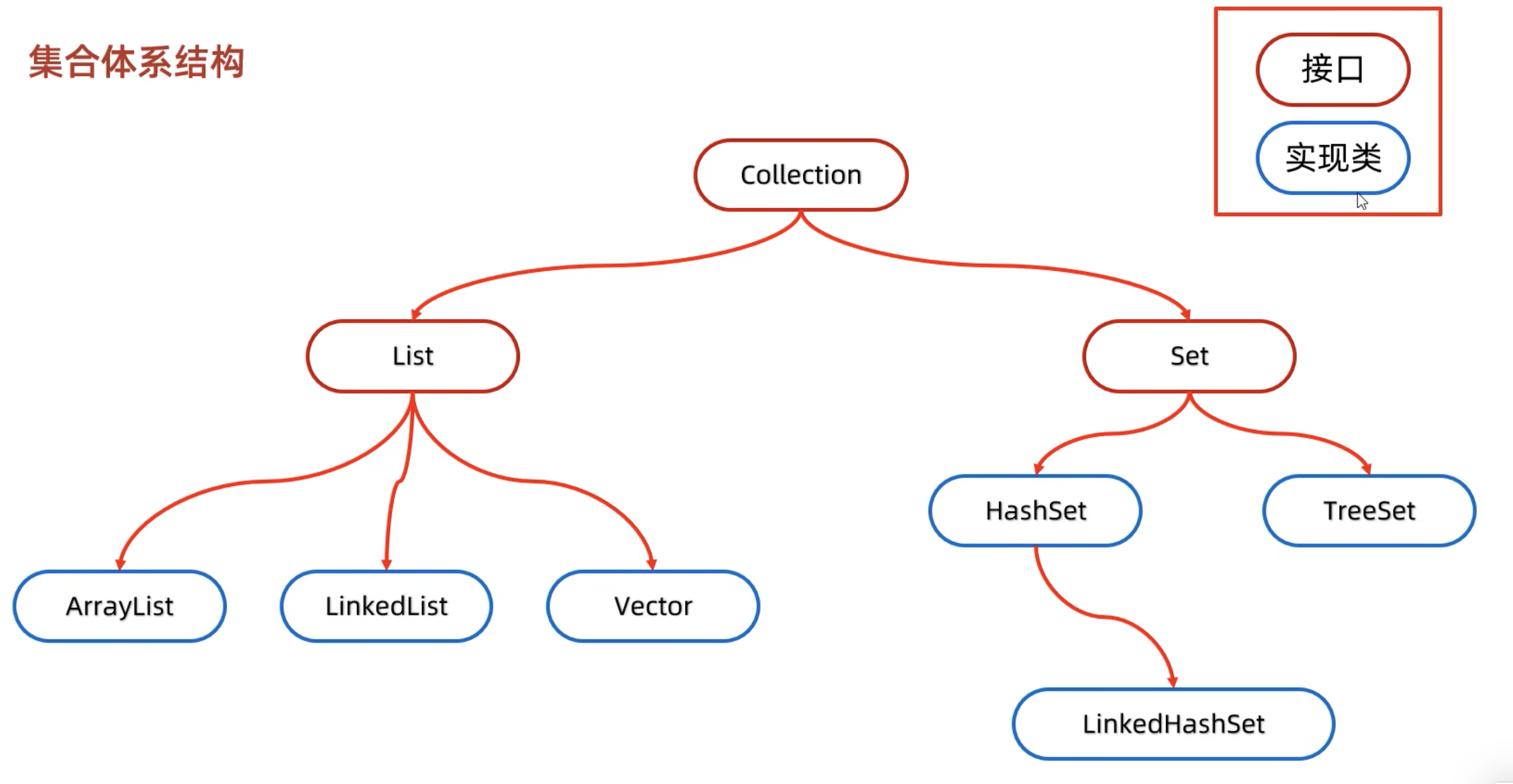
4 集合

集合

4.1 Collection

Collection 是 Java 集合框架的根接口,位于 java.util 包中。它表示一组对象(称为元素),并且定义了对集合进行基本操作的方法

4.1.1 Collection接口核心方法

方法名 描述
boolean add(E e) 向集合中添加一个元素。
boolean remove(Object o) 从集合中移除指定的元素。
boolean contains(Object o) 判断集合是否包含指定的元素。
int size() 返回集合中的元素数量。
boolean isEmpty() 判断集合是否为空。
void clear() 清空集合中的所有元素。
Iterator<E> iterator() 返回一个迭代器,用于遍历集合中的元素。

4.1.2 例子

1
2
3
4
5
6
7
8
9
10
11
12
13
14
15
16
17
18
19
20
21
22
23
24
25
26
27
28
29
30
31
32
33
34
35
36
37
38
39
40
41
42
43
44
45
46
47
48
49
50
51
52
53
54
55
56
57
58
59
60
61
62
63
64
65
66
67
68
import java.util.ArrayList;
import java.util.Collection;
import java.util.HashSet;
import java.util.Iterator;

/**
* 该类演示了 Collection 接口的基本操作。
*/
public class CollectionExample {

public static void main(String[] args) {
// 1. 创建一个 Collection 实例(使用 ArrayList)
Collection<String> collection = new ArrayList<>();

// 2. 添加元素到集合
collection.add("Apple");
collection.add("Banana");
collection.add("Cherry");

System.out.println("初始的 Collection: " + collection); // 初始的 Collection: [Apple, Banana, Cherry]

// 3. 检查集合是否为空
boolean isEmpty = collection.isEmpty();
System.out.println("集合是否为空: " + isEmpty);

// 4. 获取集合的大小
int size = collection.size();
System.out.println("集合的大小: " + size);

// 5. 检查集合是否包含某个元素
boolean containsBanana = collection.contains("Banana");
System.out.println("集合是否包含 'Banana': " + containsBanana);

// 6. 删除集合中的元素
collection.remove("Banana");
System.out.println("删除 'Banana' 后的 Collection: " + collection);

// 7. 遍历集合(使用增强型 for 循环)
System.out.println("使用增强型 for 循环遍历集合:");
for (String item : collection) {
System.out.println(item);
}

// 8. 使用 Iterator 遍历集合
System.out.println("使用 Iterator 遍历集合:");
Iterator<String> iterator = collection.iterator();
while (iterator.hasNext()) {
String item = iterator.next();
System.out.println(item);
}

// 9. 清空集合
collection.clear();
System.out.println("清空后的 Collection: " + collection);

// 10. 使用 HashSet 演示 Collection 的另一个实现
// HashSet<> 是 Java 里的集合,特点:
// ✅ 不能存重复元素
// ✅ 无序(存的顺序和取出来不一样)
// ✅ 底层靠哈希表,查询、增删很快
Collection<String> hashSetCollection = new HashSet<>();
hashSetCollection.add("Orange");
hashSetCollection.add("Apple");
hashSetCollection.add("Banana");

System.out.println("HashSet Collection: " + hashSetCollection); // HashSet Collection: [Apple, Orange, Banana]
}
}

4.2 List

表示有序集合的接口

4.2.1 List特有的核心方法

方法名 描述
void add(int index, E element) 在指定索引位置插入一个元素。
E get(int index) 返回指定索引位置的元素。
E set(int index, E element) 替换指定索引位置的元素,并返回被替换的旧元素。
E remove(int index) 移除指定索引位置的元素,并返回被移除的元素。
int indexOf(Object o) 返回指定元素在列表中首次出现的索引,如果不存在则返回-1
int lastIndexOf(Object o) 返回指定元素在列表中最后一次出现的索引,如果不存在则返回-1
List<E> subList(int fromIndex, int toIndex) 返回从fromIndex(包含)到toIndex(不包含)范围内的子列表。

4.2.2 例子

1
2
3
4
5
6
7
8
9
10
11
12
13
14
15
16
17
18
19
20
21
22
23
24
25
26
27
28
29
30
31
32
33
34
35
36
37
38
39
40
41
42
43
44
45
46
47
48
49
50
51
52
53
54
55
56
import java.util.ArrayList;
import java.util.LinkedList;
import java.util.List;

/**
* 该类演示了 List 接口的基本操作。
*/
public class ListExample {

public static void main(String[] args) {
// 1. 创建一个 ArrayList 实例
List<String> arrayList = new ArrayList<>();

// 2. 添加元素到 List
arrayList.add("Apple");
arrayList.add("Banana");
arrayList.add("Cherry");

System.out.println("初始的 ArrayList: " + arrayList);

// 3. 在指定位置插入元素
arrayList.add(1, "Blueberry"); // 在索引 1 的位置插入 "Blueberry"
System.out.println("在索引 1 插入元素后的 ArrayList: " + arrayList);

// 4. 访问 List 中的元素
String element = arrayList.get(2); // 获取索引为 2 的元素
System.out.println("索引 2 处的元素: " + element);

// 5. 修改 List 中的元素
arrayList.set(3, "Dragonfruit"); // 将索引 3 的元素替换为 "Dragonfruit"
System.out.println("修改索引 3 元素后的 ArrayList: " + arrayList);

// 6. 删除 List 中的元素
arrayList.remove("Banana"); // 删除值为 "Banana" 的元素
System.out.println("删除 'Banana' 后的 ArrayList: " + arrayList);

// 7. 遍历 List(使用增强型 for 循环)
System.out.println("使用增强型 for 循环遍历 ArrayList:");
for (String item : arrayList) {
System.out.println(item);
}

// 8. 使用 LinkedList 演示 List 的另一个实现
List<String> linkedList = new LinkedList<>();
linkedList.add("Orange");
linkedList.add("Apple");
linkedList.add("Banana");

System.out.println("LinkedList: " + linkedList);

// 9. 在 LinkedList 中插入和删除元素
linkedList.add(1, "Mango"); // 在索引 1 的位置插入 "Mango"
linkedList.remove(2); // 删除索引为 2 的元素
System.out.println("修改后的 LinkedList: " + linkedList);
}
}

4.3 ArrayList

通过特殊的设计实现了List接口,底层为数组结构

4.3.1 ArrayList底层原理

  • 1.利用空参构造创建一个空数组
  • 2.初始添加元素时将数组大小扩容为10
  • 3.后续添加元素时超出了原数组大小,就自动扩容为1.5倍或者(原数组size+后续添加元素个数(如果大于1.5))

4.3.2 ArrayList源码
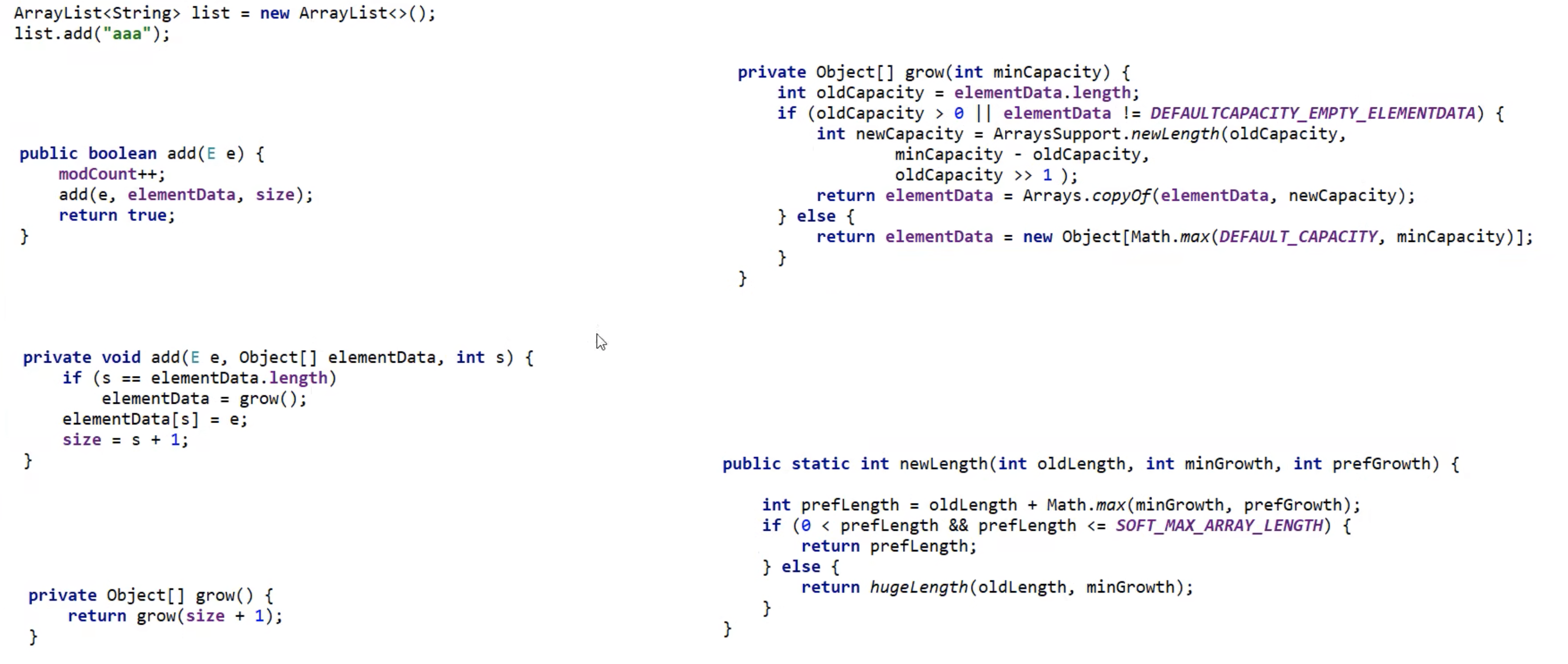
ArrayList源码

在扩容时重新取了一块储存空间,所以相对数组它的大小可以变,不怕周围没空间

4.4 LinkedList

底层数据结构为双链表,增删快,查询慢

4.4.1 LinkedList原理

  • 基于双向链表,每个节点包含数据和前后指针

4.4.2 LinkedList源码
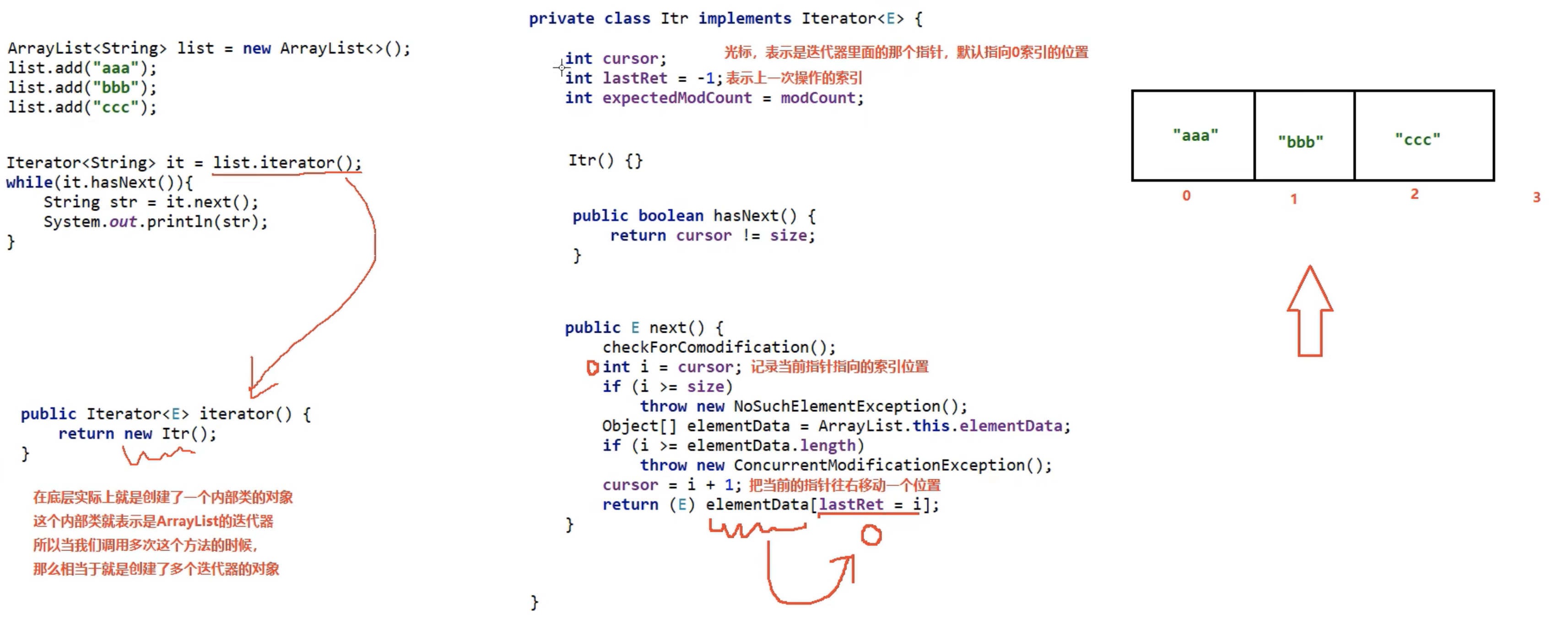
LinkedList源码

4.5 数据结构

  1. 二叉树,每个节点的度<=2
  2. 二叉查找树:任意节点左子树上的值都小于当前节点,右子树树上的节点都大于当前节点
  3. 平衡二叉树:任意节点左右子树高度差不超过1
  4. 红黑树:增删查改性能都很好的数结构

4.6 Set集合

4.6.1 Set接口

方法名称 说明
public boolean add(E e) 把给定的对象添加到当前集合中
public void clear() 清空集合中所有的元素
public boolean remove(E e) 把给定的对象在当前集合中删除
public boolean contains(Object obj) 判断当前集合中是否包含给定的对象
public boolean isEmpty() 判断当前集合是否为空
public int size() 返回集合中元素的个数/集合的长度

4.6.2 3个实现类

set实现类
1
2
3
4
5
6
7
8
9
10
11
12
13
14
15
16
17
18
19
20
21
22
23
24
25
26
27
28
29
30
31
32
33
34
35
36
37
38
39
40
41
42
43
44
45
46
47
48
49
50
51
52
53
54
55
56
57
58
59
60
61
import java.util.*;

public class SetExample {

public static void main(String[] args) {
// 1. 使用 HashSet 演示无序且不允许重复的集合
System.out.println("==== HashSet 示例 ====");
Set<String> hashSet = new HashSet<>();
hashSet.add("Apple");
hashSet.add("Banana");
hashSet.add("Orange");
hashSet.add("Apple"); // 重复元素不会被添加

System.out.println("HashSet 内容: " + hashSet); // 输出顺序可能不同
System.out.println("是否包含 'Banana': " + hashSet.contains("Banana")); // true
System.out.println("HashSet 大小: " + hashSet.size()); // 3

// 2. 使用 LinkedHashSet 演示按插入顺序存储的集合
System.out.println("\n==== LinkedHashSet 示例 ====");
Set<String> linkedHashSet = new LinkedHashSet<>();
linkedHashSet.add("One");
linkedHashSet.add("Two");
linkedHashSet.add("Three");

System.out.println("LinkedHashSet 内容: " + linkedHashSet); // 保持插入顺序
linkedHashSet.remove("Two");
System.out.println("移除 'Two' 后的内容: " + linkedHashSet);

// 3. 使用 TreeSet 演示自动排序的集合
System.out.println("\n==== TreeSet 示例 ====");
Set<Integer> treeSet = new TreeSet<>();
treeSet.add(10);
treeSet.add(5);
treeSet.add(20);
treeSet.add(5); // 重复元素不会被添加

System.out.println("TreeSet 内容: " + treeSet); // 自动按升序排列
System.out.println("第一个元素: " + ((TreeSet<Integer>) treeSet).first()); // 5
System.out.println("最后一个元素: " + ((TreeSet<Integer>) treeSet).last()); // 20

// 4. 数学集合运算:交集、并集、差集
System.out.println("\n==== 数学集合运算示例 ====");
Set<Integer> setA = new HashSet<>(Arrays.asList(1, 2, 3, 4, 5));
Set<Integer> setB = new HashSet<>(Arrays.asList(4, 5, 6, 7));

// 并集
Set<Integer> union = new HashSet<>(setA);
union.addAll(setB);
System.out.println("并集: " + union);

// 交集
Set<Integer> intersection = new HashSet<>(setA);
intersection.retainAll(setB);
System.out.println("交集: " + intersection);

// 差集
Set<Integer> difference = new HashSet<>(setA);
difference.removeAll(setB);
System.out.println("差集 (setA - setB): " + difference);
}
}

5 Map接口

常用方法:

方法名 描述
V put(K key, V value) 将指定的键值对插入到Map中。如果键已经存在,则替换旧的值并返回旧值。
V get(Object key) 返回指定键所映射的值,如果键不存在则返回null
V remove(Object key) Map中移除指定键及其对应的值,并返回被移除的值。
boolean containsKey(Object key) 如果Map中包含指定的键,则返回true
boolean containsValue(Object value) 如果Map中包含指定的值,则返回true
Set<K> keySet() 返回Map中所有键的集合。
Collection<V> values() 返回Map中所有值的集合。
Set<Map.Entry<K,V>> entrySet() 返回Map中所有键值对的集合。
void clear() 清空Map中的所有键值对。
int size() 返回Map中键值对的数量。

6 泛型

  1. 泛型类:class 类名<T> { ... }
  2. 泛型接口:interface 接口名<T> { ... }
  3. 泛型方法:<T> 返回值类型 方法名(参数列表) { ... }
1
2
3
4
5
6
7
8
9
10
11
12
13
14
15
16
17
18
19
20
21
22
23
24
25
26
27
28
29
30
31
32
33
34
35
36
37
38
39
40
41
42
43
44
45
46
47
48
49
50
51
52
53
54
55
56
57
58
59
60
61
62
63
64
65
66
67
68
69
70
71
72
73
74
75
76
77
78
79
80
81
82
83
84
85
86
87
88
89
90
import java.util.ArrayList;
import java.util.List;

/**
* 本文件展示了Java泛型的基本用法,包括泛型类、泛型接口和泛型方法。
*/
public class GenericExample {

/**
* 泛型类示例:Box<T>
* 用于存储任意类型的数据。
*/
public static class Box<T> {
private T item;

public void setItem(T item) {
this.item = item;
}

public T getItem() {
return item;
}
}

/**
* 泛型接口示例:Container<T>
* 定义了一个可以存储和获取元素的容器。
*/
public interface Container<T> {
void add(T item);
T get(int index);
}

/**
* 实现泛型接口的类:StringContainer
* 专门用于存储字符串类型的容器。
*/
public static class StringContainer implements Container<String> {
private List<String> items = new ArrayList<>();

@Override
public void add(String item) {
items.add(item);
}

@Override
public String get(int index) {
return items.get(index);
}
}

/**
* 泛型方法示例:printArray(T[] array)
* 打印任意类型的数组内容。
*/
public static <T> void printArray(T[] array) {
for (T element : array) {
System.out.println(element);
}
}

/**
* 主方法:测试泛型类、接口和方法的功能。
*/
public static void main(String[] args) {
// 测试泛型类 Box<T>
Box<Integer> integerBox = new Box<>();
integerBox.setItem(123);
System.out.println("泛型类 Box<Integer> 存储的值: " + integerBox.getItem());

Box<String> stringBox = new Box<>();
stringBox.setItem("Hello, Generics!");
System.out.println("泛型类 Box<String> 存储的值: " + stringBox.getItem());

// 测试泛型接口 Container<T>
Container<String> container = new StringContainer();
container.add("Item 1");
container.add("Item 2");
System.out.println("泛型接口 Container<String> 获取的值: " + container.get(0));

// 测试泛型方法 printArray(T[] array)
Integer[] intArray = {1, 2, 3};
System.out.println("泛型方法 printArray(Integer[]):");
printArray(intArray);

String[] stringArray = {"A", "B", "C"};
System.out.println("泛型方法 printArray(String[]):");
printArray(stringArray);
}
}

7 异常处理

  1. try-catch :主要用于捕获和处理异常 => 需要代码继续运行时使用

  2. throw :用于主动抛出异常,适合在检测到错误条件时通知调用者 => 不用代码继续运行时使用

    1
    2
    3
    4
    5
    6
    7
    8
    9
    10
    11
    12
    13
    14
    15
    16
    17
    18
    19
    20
    21
    22
    23
    24
    25
    26
    27
    28
    29
    30
    31
    32
    33
    34
    35
    36
    37
    38
    39
    40
    41
    42
    43
    44
    45
    46
    47
    48
    49
    50
    51
    52
    53
    54
    55
    56
    57
    58
    59
    60
    61
    62
    63
    64
    65
    66
    67
    import java.io.FileReader;
    import java.io.IOException;

    // 自定义异常类
    class CustomException extends Exception {
    public CustomException(String message) {
    super(message);
    }
    }

    public class ExceptionHandlingExample {

    public static void main(String[] args) {
    // 示例 1: 捕获非受检异常 (RuntimeException)
    try {
    int result = divide(10, 0); // 可能抛出 ArithmeticException
    System.out.println("结果: " + result);
    } catch (ArithmeticException e) {
    System.out.println("捕获到运行时异常: " + e.getMessage());
    }

    // 示例 2: 处理受检异常 (Checked Exception)
    try {
    readFile("nonexistent.txt"); // 文件不存在会抛出 IOException
    } catch (IOException e) {
    System.out.println("捕获到 IO 异常: " + e.getMessage());
    } finally {
    System.out.println("finally 块总是执行");
    }

    // 示例 3: 抛出自定义异常
    try {
    validateAge(-5); // 年龄为负数时抛出自定义异常
    } catch (CustomException e) {
    System.out.println("捕获到自定义异常: " + e.getMessage());
    }
    }

    // 方法 1: 可能抛出非受检异常的方法
    public static int divide(int a, int b) {
    if (b == 0) {
    throw new ArithmeticException("除数不能为零");
    }
    return a / b;
    }

    // 方法 2: 可能抛出受检异常的方法
    public static void readFile(String fileName) throws IOException {
    FileReader reader = null;
    try {
    reader = new FileReader(fileName);
    System.out.println("文件读取成功");
    } finally {
    if (reader != null) {
    reader.close(); // 确保资源释放
    }
    }
    }

    // 方法 3: 抛出自定义异常的方法
    public static void validateAge(int age) throws CustomException {
    if (age < 0) {
    throw new CustomException("年龄不能为负数");
    }
    System.out.println("年龄验证通过: " + age);
    }
    }